



Gemini is Google’s generative artificial intelligence platform, developed by Google DeepMind and now integrated into an ever-wider ecosystem of applications, devices and services.
Gemini comprises a family of artificial intelligence models and the related experiences that Google makes available through the Gemini app, Android, Google Workspace and other products.
Gemini has evolved over time, and it has done so very quickly. From the earlier Bard experience it has moved to models increasingly capable of processing text, images, audio, video and code, up to the latest generations designed also to carry out complex tasks and interact with tools and applications. In 2026, Google expanded the family further with Gemini 3.5, Gemini 3.6, Gemini 3.8 and other specialised models.
In this article we take a closer look at what it is, what it includes and how it can be useful.
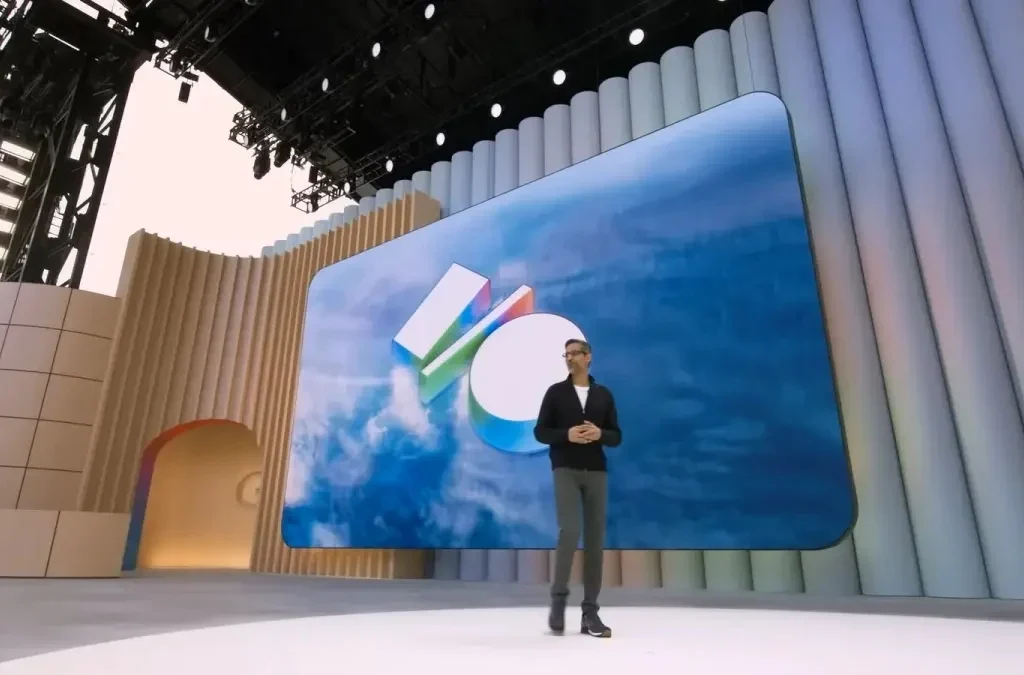
Sundar Pichai on stage at Google I/O 2026 presenting the latest Gemini features
What is Gemini?
Gemini is the generative AI ecosystem developed by Google to understand natural-language requests, process different types of content and produce answers or outputs based on the information it receives.
When talking about Google Gemini, then, it is important to distinguish at least three elements:
- the Gemini family of models, i.e. the AI systems developed by Google DeepMind;
- the Gemini app, through which users can interact with these models;
- the Gemini features integrated into Google products such as Gmail, Google Drive, Android and other services.
This distinction matters because Gemini does not refer to a single, fixed model. Google continually updates its family of models, introducing different versions for tasks that require speed, reasoning, multimodality, content generation or real-time interaction. Google DeepMind’s documentation in fact lists numerous recent variants of the Gemini family, including Gemini 3.8, Gemini 3.6, Gemini 3.5 and Gemini 3.1.
How does Gemini work?
Gemini works through generative artificial intelligence models trained to recognise patterns and relationships within large volumes of data. When the user enters a request, the model interprets the context, processes the available information and generates a response consistent with the prompt.
Its most important feature, however, is multimodality. Gemini is not designed to work with text alone: depending on the model and the feature being used, it can understand and generate content across different modalities, including text, images, audio, video and code.
This makes it possible, for example, to:
- ask a question by typing text;
- use your voice to converse with Gemini;
- upload or photograph an image and ask for it to be analysed;
- analyse documents;
- working with code;
- generate images;
- use multimodal content within the same workflow.
Google also describes its latest models as systems designed to handle complex tasks and agentic workflows. Gemini 3.5, for example, was presented as a family of models able to combine advanced reasoning and action capabilities.
What can you do with Gemini?
What is possible depends on the model, the app and the plan being used, but Gemini can be employed in a wide range of personal and professional contexts.
Scrivere e riscrivere
Bozze, email, riassunti. Cambiare il tono di un testo o ricavarne una prima struttura.
Studiare e capire
Spiegare concetti, creare schemi, trasformare argomenti complessi in spiegazioni semplici.
Analizzare documenti
Individuare informazioni e sintetizzare contenuti, anche dall'ecosistema Google.
Analizzare immagini
Interpretare una foto e usarla come contesto per rispondere o identificare elementi.
Generare contenuti
Immagini e, con i modelli dedicati, contenuti multimediali a partire da input differenti.
Programmare
Generare codice, spiegare una funzione, individuare problemi, assistere nello sviluppo.
Cercare e pianificare
Raccogliere informazioni, sviluppare piani, interagire con servizi come Maps e Voli.
Conversare a voce
Dialogare in tempo reale, con fotocamera e schermo come parte del contesto.
Supportare il lavoro
Brainstorming, organizzazione di idee, prime bozze: le fasi iniziali, non il risultato finale.
Le funzionalità effettivamente disponibili dipendono dal modello, dall'applicazione e dal piano utilizzato.
Writing and rewriting content
Gemini can help create drafts, emails, copy, content ideas, summaries and documents. It can also edit existing text, change its tone, condense it or develop an initial structure from the user’s instructions.
Studying and understanding complex topics
It can be used to explain concepts, create outlines, summarise information and turn complex topics into simpler explanations.
Analysing documents and information
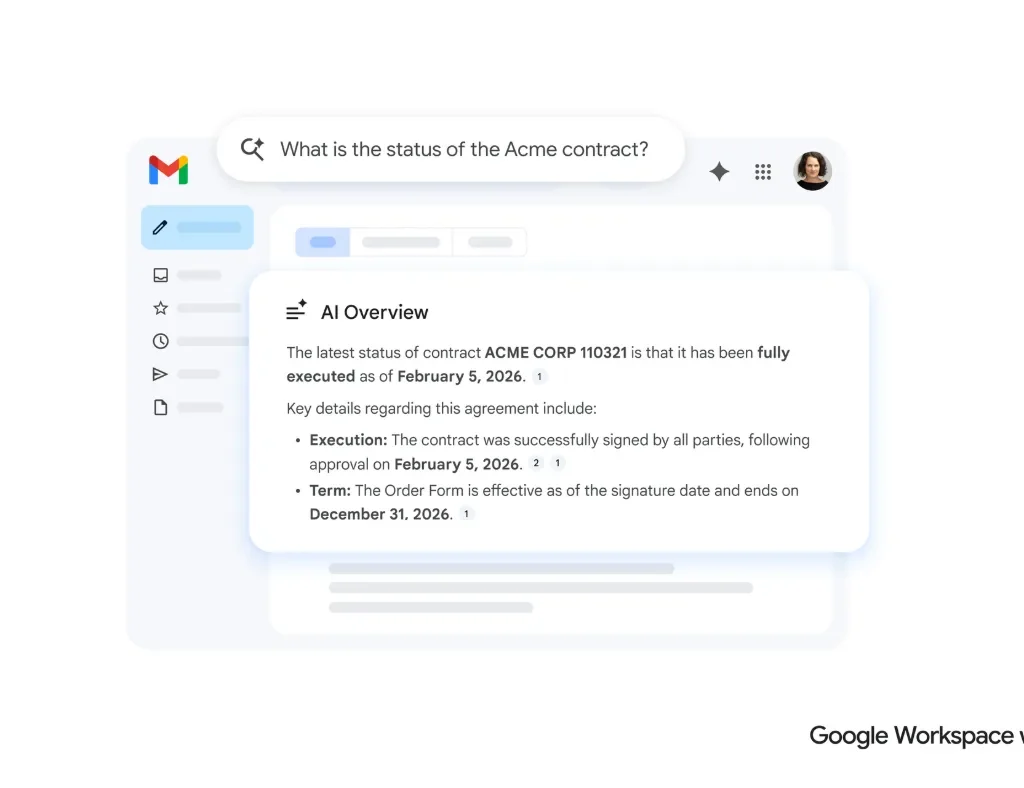
Depending on the features available, Gemini can work with files and content from the Google ecosystem, making it possible to locate information, summarise documents or quickly retrieve specific content.
The mobile app, for example, can provide summaries and information from Gmail or Google Drive.
Analysing images
Gemini can interpret images provided by the user and use what it sees as context to answer questions, identify elements or assist in analysing the content.
Generating images and multimedia content
Gemini’s generative capabilities have gradually extended beyond text. Google has introduced dedicated models for generating and editing images and, with Gemini Omni, has presented an approach in which different inputs can be transformed into multimedia content, starting with video generation.
Coding
Gemini can also be used for programming tasks, such as generating code, explaining a function, identifying problems or assisting in application development.
The most recent models are also designed for more complex agentic and software development tasks. Google points, for example, to Gemini 3.5 Flash as a model intended also for agentic workflows and coding tasks.
Searching for information and organising tasks
Gemini can be used to gather information, develop plans and organise tasks. Within the Google ecosystem it can also interact with services such as Maps and Google Flights to support planning.
How do you use Gemini?
Using Gemini is relatively straightforward. It can be accessed via the web experience or the mobile app, while some features are built directly into other Google products.
To get started, simply write a request, known as a prompt, stating as clearly as possible what you want to achieve.
A generic prompt such as “Tell me about marketing” leaves the model a great deal of latitude.
A more precise request might instead be: “Explain the main digital marketing strategies for a small business, organising them in a table with objective, indicative cost and difficulty.”
The second version defines the topic, audience, format and expected outcome more precisely, making it easier to obtain a useful response.
The Gemini mobile app also accepts text, voice, photos and the camera as input methods. On Android devices, some features let users ask for help with what is shown on screen.
Richiesta generica
«Parlami di marketing.»
Lascia al modello la scelta di argomento, taglio, profondità e formato. La risposta sarà ampia e probabilmente inutile.
Richiesta definita
«Spiegami le principali strategie di marketing digitale per una piccola azienda, organizzandole in una tabella con obiettivo, costo indicativo e difficoltà.»
Quattro vincoli rendono la risposta verificabile:
Is Gemini free?
Yes, there is free access to Gemini, but free does not mean unlimited access to every feature and every model.
Google applies usage limits that may depend on the complexity of the request, the model used and the features enabled. For users who need higher limits and broader access to models and tools, Google offers paid Google AI plans.
In Italy, Google One currently offers several Google AI plans, including Google AI Plus, Google AI Pro and Google AI Ultra, with different levels of access to artificial intelligence features and different amounts of storage.
Plan features may change over time, so for up-to-date availability, limits and terms it is advisable to check Google’s offering directly.
What is the difference between Gemini vs ChatGPT?
Gemini and ChatGPT are both generative artificial intelligence systems, but they belong to different ecosystems.
Gemini is developed by Google DeepMind and is closely tied to the Google ecosystem. ChatGPT, by contrast, is developed by OpenAI and sits at the centre of OpenAI’s AI ecosystem.
The most interesting difference, then, lies not only in the ability to answer questions, but also in how each system integrates with the tools and services around it.
Gemini may be of particular interest to those who make heavy use of:
- Gmail;
- Google Drive;
- Google Docs;
- Android;
- Google Maps;
- other Google services.
ChatGPT, on the other hand, may be preferable in certain workflows tied to the OpenAI ecosystem and the tools available on its platform.
There is therefore no universal answer to the question “is Gemini or ChatGPT better?”. The choice depends on the type of task, the tools in use, the features required and the user’s way of working.
Gemini and Google: an increasingly integrated ecosystem
One of the things that sets Gemini apart from many other AI tools is its progressive integration into the Google ecosystem.
Artificial intelligence is no longer offered solely as a separate window in which to enter a prompt. Google is bringing Gemini into a range of products, devices and services, creating experiences in which AI can become part of the normal workflow.
Depending on the product and geographical availability, this includes:
- Android;
- Gmail;
- Google Drive;
- Google Docs;
- Google Maps;
- Google Flights;
- Google Workspace;
- connected devices and services.
Google has also announced a progressive extension of Gemini experiences to new products and formats, including agentic tools and different devices.
Gemini Live: conversing with artificial intelligence
Gemini Live is the experience designed to make conversation with AI more natural and interactive.
Users can converse by voice and, depending on the feature available, also use visual elements such as the camera and screen as part of the context.
In 2026, Google continued to develop models specifically for real-time conversation. Gemini 3.8 Live and Gemini 3.8 Live Extended Thinking were presented as models designed to improve voice dialogue and reasoning during complex interactions.

Gemini for work and productivity
Gemini can also be used as a professional support tool.
Uses may include:
- drafting emails;
- summarising documents;
- brainstorming;
- organising ideas;
- information analysis;
- creating first drafts;
- researching and gathering information;
- programming;
- task planning;
- productivity support.
The main advantage does not necessarily lie in handing a task over entirely to artificial intelligence, but in reducing the time spent on repetitive tasks and in the early stages of research, analysis and production.
Google itself describes the Gemini apps as tools for brainstorming ideas, developing plans, understanding complex topics and drafting content.
When use moves from the individual professional to the organisation, the question changes: it is no longer enough to know what Gemini does; you have to decide how to bring it into your own working environment. Gemini for business can mean Google Workspace with Gemini, built into the work tools already in use, or Gemini Enterprise, which adds AI agents and search across company data. The choice depends on the data you want to make accessible, and on the organisation’s objectives and size.
Is Gemini always reliable?
No. Gemini can produce inaccurate or inappropriate responses, just like other generative AI systems.
This is a fundamental point to bear in mind when using a language model: a convincingly worded answer is not necessarily a correct one.
For this reason, it is important to verify key information; check data, figures and quotations; verify sources where available; not automatically treat the output as professional advice; review code before using it in production; maintain human oversight in important decisions.
Google itself warns users that Gemini apps can make mistakes and recommends checking responses, especially when they concern important information or professional matters.
Una risposta formulata in modo convincente non è necessariamente una risposta corretta.
- Verificare dati, numeri e citazioni
- Controllare le fonti, quando sono disponibili
- Non usare l'output come consulenza professionale
- Controllare il codice prima di portarlo in produzione
- Mantenere la supervisione umana sulle decisioni importanti
- Valutare quali informazioni si stanno condividendo prima di inserirle
Gemini and privacy: what to consider
When using an artificial intelligence system, it is also important to consider what information is being shared.
Before entering personal data, confidential information, company documents or sensitive content into Gemini, it is advisable to understand the available settings, how data is processed and the rules that apply to the account in use.
Management options may also vary depending on the type of account, for example personal, work or school, and on the features being used.
For this reason, privacy should not be treated as a secondary technical detail, but as part of managing AI properly.
What are the Gemini models?
The Gemini family includes numerous models and variants, designed for different needs.
In 2026 Google DeepMind lists, among others, Gemini 3.8 Flash, Gemini 3.8 Audio, Gemini 3.7 Flash, Gemini 3.6 Flash, Gemini 3.5 Flash, Gemini 3.1 Pro and Gemini 3.1 Flash-Lite, as well as specialised models for images, audio, robotics and other applications.
This means that speaking generically of “the Gemini model” can be reductive.
The family includes systems optimised for speed, reasoning, programming, audio, images, real-time conversation, agentic use and specialised applications.
The availability of each model depends on the application, the product and the plan used.
Why does Gemini matter in the artificial intelligence landscape?
Gemini represents one of the leading attempts to integrate generative artificial intelligence not just into a chatbot, but into a complete digital ecosystem.
Google is increasingly moving towards systems capable of:
- understanding different types of input;
- reason through complex problems;
- generate content;
- use tools;
- assisting the user with tasks;
- interact with applications;
- operating across different devices.
In 2026, Google described Gemini 3.5 as part of a new generation geared also towards agentic tasks, while continuing to extend Gemini’s integration across its products.
The difference from the first generation of AI chatbots is therefore becoming increasingly clear: the aim is not just to answer a question, but to help the user carry a task forward.
So, what is Gemini? And what is it for?
Gemini is Google’s generative artificial intelligence ecosystem, developed by Google DeepMind and built on a family of multimodal models.
It can be used to:
- obtain information and explanations;
- writing and rewriting content;
- summarising documents;
- analyse images;
- generate content;
- coding;
- studying;
- brainstorm;
- organise tasks;
- interact by voice;
- use services within the Google ecosystem;
- support professional and personal tasks.
Access can be free, while Google AI plans provide higher limits and broader access to certain models and features.
The most important thing to understand, however, is that Gemini is not a static product. It is a constantly evolving platform, made up of different models and progressively integrated into the Google ecosystem.
For this reason, when assessing Gemini, it is not enough simply to ask “what is it?”. It is more useful to understand which model you are using, which features are available, which plan you have and in what context Gemini is being used.
Domande frequenti
Is Gemini free?
Yes. Gemini offers a free tier of access, but models, features and usage limits vary by plan. Google also offers Google AI Plus, Pro and Ultra subscriptions, which extend access to certain models and tools.
What is the difference between Gemini and ChatGPT?
Gemini is the artificial intelligence ecosystem developed by Google DeepMind and is deeply integrated with products such as Gmail, Drive, Docs, Maps and Android. ChatGPT, by contrast, belongs to the OpenAI ecosystem. The choice therefore depends not only on the model, but also on the tools and workflows you use.
Are Gemini's answers always reliable?
No. Like other generative artificial intelligence systems, Gemini can produce inaccurate information or present incorrect information as correct. Google itself recommends checking important answers and not using Gemini as an automatic substitute for professional advice or human review.
Fonti e riferimenti
- Google, Bard diventa Gemini: ecco Ultra 1.0 e una nuova app mobile
- Google, Gemini 3.5: frontier intelligence with action
- Google, Google I/O 2026: News and announcements
- Google, Il prossimo capitolo della nostra era Gemini
- Google, The Gemini app becomes more agentic, delivering proactive, 24/7 help
- Google DeepMind, Gemini 3.8 Flash
- Google DeepMind, Model Cards
- Google DeepMind, Models
- Google One, Piani Google AI
- Google Support, Centro per la privacy delle app Gemini
- Google Support, Informazioni sulle risposte dalle app Gemini
- Google Support, Usa e gestisci le App connesse in Gemini