



Claude is the artificial intelligence assistant developed by Anthropic and, at the same time, the family of large language models (LLMs) on which the assistant is built. It can be used in the browser at claude.ai, through the desktop and smartphone apps, from the terminal with Claude Code or, for developers and businesses, via the API and cloud platforms such as Amazon Bedrock, Google Cloud and Microsoft Foundry.
As of October 2026, the public range comprises four main models: Claude Fable 5.1, Claude Opus 5.5, Claude Sonnet 5.5 and Claude Haiku 5.5. They are different tiers of the same technology, distinguished by capability, speed and cost.
In this guide you will find what Claude is and where it comes from, how the constitutional AI approach works, the differences between the models, what the plans cost, how to start using it well and how it compares with ChatGPT and Gemini. Technical data and prices refer to the official sources listed at the end of the article.
What is Claude AI?
The name “Claude” refers to two related things. The first is a family of generative artificial intelligence models: programs trained on vast amounts of text, capable of understanding natural language, reasoning through a problem and producing text, code and analysis. The second is the Claude assistant, the application through which people interact with those models, now available on the web, on Mac and Windows, and on iOS and Android.
The distinction matters because it explains many frequently asked questions. “Claude Opus” or “Claude Sonnet” refers to a specific model; “using Claude” usually means the app, which lets you choose the model best suited to the task.
Claude models are proprietary and closed: Anthropic does not release the weights and does not allow them to be run locally. To use them, you must go through Anthropic’s products or through third-party applications that access the models via API, such as development tools, cloud platforms or enterprise software.
From chatbot to agent
In its early versions, Claude was essentially a chatbot: one question, one answer. Today its scope is broader. It can search the web, read documents and images, write and run code, create files, connect to external apps through connectors, and carry out multi-step tasks even while the user is away from the screen.
A major step came on 16 September 2026, when Anthropic merged Claude Cowork, the environment designed for longer tasks, into the standard chat. Since then, the same conversation can handle a quick question or a complex assignment, such as preparing a report with accompanying slides. The same announcement introduced Claude Docs and Claude Slides, in beta on paid plans, for writing documents and presentations directly within Claude and exporting them to PowerPoint or PDF.
What it can do, in brief
- Writing, summarising, translating and rephrasing texts in many languages, Italian included.
- Analysing long documents, PDFs, spreadsheets and images.
- Writing, explaining and fixing code, up to working on entire software projects with Claude Code.
- Search the web and cite the sources consulted.
- Create documents, presentations, small applications and visualisations.
- Carry out multi-step tasks by connecting to tools such as email, calendars or company archives.
It does, however, remain a model that produces text: it reads images but does not generate them as an image generator would, and it does not natively process video. This is one of the areas where it differs from some competitors, as we will see in the comparison.

Anthropic: who created Claude and why?
Claude is developed by Anthropic, a US artificial intelligence research and products company founded in 2021 by a group of former OpenAI employees. Its founders include the siblings Dario Amodei, chief executive, and Daniela Amodei, president.
The decision to leave OpenAI, taken before ChatGPT reached the general public, stemmed from a different vision of how AI should be developed. At the heart of Anthropic’s project are model safety and interpretability, that is, the ability to understand what happens inside the models. This approach has also had concrete consequences for the company’s relations with the US government, culminating in the 2026 clash between Anthropic and the Pentagon.
The company is incorporated as a public benefit corporation (PBC), a corporate form that pairs profit with a formal commitment to public-benefit objectives.
Investors and partners
Amazon and Google are among Anthropic’s main investors and distribute Claude models through their respective cloud platforms. This does not mean they control Claude: ownership and development of the models remain with Anthropic. Claude is also available on Microsoft Foundry, so companies can use it on AWS, Google Cloud and Microsoft Azure without changing infrastructure provider.
Anthropic’s growth has also turned its rivalry with OpenAI into a financial contest. The two companies’ listing prospects show how far the market is attributing value not only to models, but also to the ability to build infrastructure, revenue and access to capital: we discussed this in our comparison of Anthropic and OpenAI on the road to IPO.
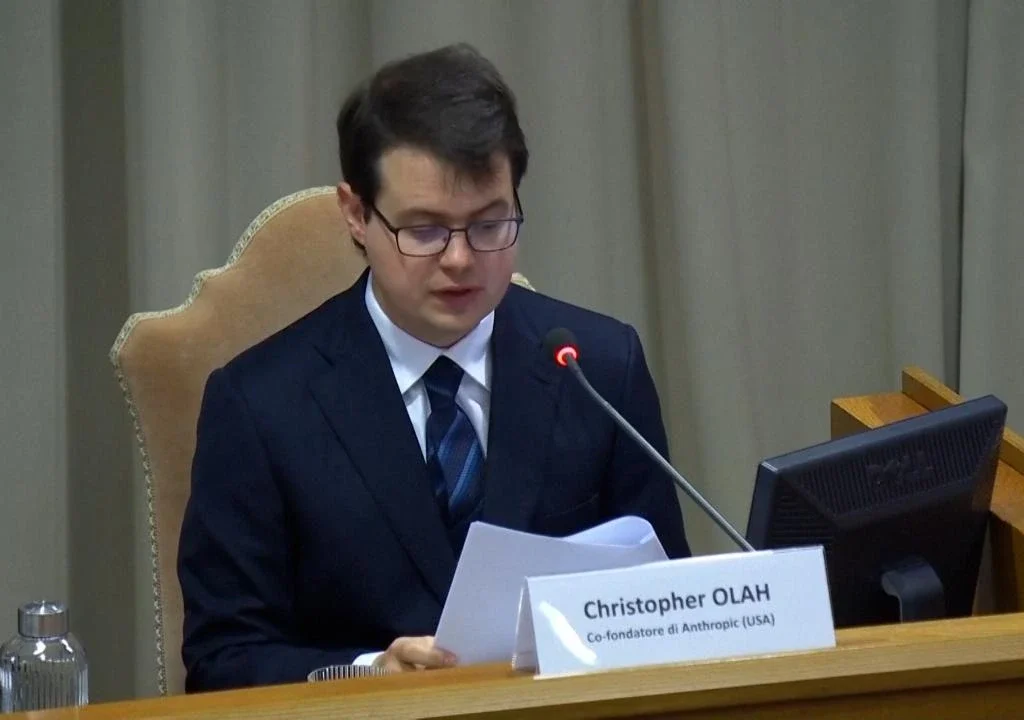
Anthropic has also built a dialogue with institutions, governments and organisations outside the technology sector on the issues raised by artificial intelligence. In May 2026 Christopher Olah, the company’s co-founder and head of interpretability research, was invited to the Vatican for the presentation of Pope Leo XIV’s encyclical on AI, Magnifica Humanitas.
Why it’s called Claude
The name is described as a tribute to Claude Shannon, the American mathematician and engineer regarded as the father of information theory, the theoretical foundation on which modern telecommunications and computing rest. The names of the individual models, by contrast, follow a poetic theme, explained below: Haiku, Sonnet, Opus and, from 2026, Fable.
Key milestones
Claude was introduced in March 2023, initially for a small group of companies and as an app integrated into Slack. Claude 2 arrived in July 2023, with a website open to the public. From then on the pace of releases grew steadily, reaching an almost monthly cadence in 2026, with new versions of Opus and Sonnet and the introduction of a tier above Opus.
How does Claude work?
At its core, Claude works like other large language models. During pre-training, the model learns the patterns of language from a vast body of text; when it receives a request, it breaks it down into tokens (fragments of words) and generates the response by predicting, one token at a time, the most appropriate continuation. The quality of the output depends on the data, the size of the model and, above all, on how the model is refined after pre-training.
It is in this second phase that Anthropic stands apart, with the approach it calls Constitutional AI.
What is constitutional AI
Rather than relying solely on human raters who judge responses one by one, Anthropic sets out in writing a set of principles and values, Claude’s Constitution, and uses it to guide training. In practice, the model learns to compare its own responses against those principles, critique them and revise them, so that the desired behaviour is internalised rather than imposed through external filters.
The Constitution shapes several stages of the process:
- on creating the synthetic data used to train the models;
- on training the support models used for alignment, that is, ensuring the AI’s behaviour is consistent with its developers’ intentions;
- on how Claude reasons in ambiguous situations during real-world use.
Early versions of the principles also drew on external sources, including the Universal Declaration of Human Rights. Anthropic later published a new, more extensive Constitution that describes who Claude is, which priorities it must respect and how to balance helpfulness, honesty and safety. The full text is publicly available on Anthropic’s website, although the company notes that it was written first and foremost for Claude itself.
But what does it mean, from the model’s point of view, to have been built around a Constitution and a character defined by others? We asked Claude directly in What are you? A conversation with Claude.
What changes for users
Constitutional AI has concrete effects in everyday use:
- Transparency about limits. Claude tends to say when it is unsure of something or when a piece of information may be out of date.
- Reasoned disagreement. If a premise is wrong, it is more likely to point this out than to humour the user.
- Refusals explained. When it declines a request, it usually explains why and suggests a useful alternative.
Extended thinking and adaptive thinking
From Claude 3.7 Sonnet onwards, models can reason explicitly before responding, building a step-by-step chain of thought. In current models this capability is adaptive: the model decides how much to reason based on the difficulty of the task, and the user or developer can adjust the ‘effort’ level to prioritise speed or depth. On Fable 5.1 and Opus 5.5, adaptive thinking is always on.
Claude models: Haiku, Sonnet, Opus and Fable
Claude models are organised into tiers, from the fastest and most economical to the most powerful. As of October 2026, Anthropic’s official documentation recommends Claude Opus 5.5 as the starting point for most uses, Claude Fable 5.1 for the most demanding reasoning and long-running agents, Claude Sonnet 5.5 as the best balance of speed and intelligence, and Claude Haiku 5.5 as the fastest option.
Claude Fable 5.1
Complex reasoning, long-running agents.
Latency
Slower
Context
1 million tokens
Max output
128,000 tokens
Price in / out
10 $ / 50 $
Claude Opus 5.5
Agentic coding, knowledge work, advanced general use.
Latency
Moderate
Context
1 million tokens
Max output
128,000 tokens
Price in / out
4 $ / 20 $
Claude Sonnet 5.5
Everyday tasks, code, documents, cost-efficient agents.
Latency
Low
Context
1 million tokens
Max output
128,000 tokens
Price in / out
2 $ / 10 $
Claude Haiku 5.5
Real-time responses, high volumes, classification, data extraction and sub-agents.
Latency
Lowest
Context
1 million tokens
Max output
128,000 tokens
Price in / out
From $0.10 / $0.50
API prices per million tokens, input and output. For Haiku 5.5: $0.10 / $0.50 for prompts up to 100,000 tokens; $0.50 / $2.50 for prompts above 100,000 tokens. Once the threshold is exceeded, the higher rates apply to the entire request. Price lists and model availability change frequently: check the official documentation.
All current models accept text and images as input, respond in text, are multilingual and support the use of external tools. All models have reliable knowledge up to June 2026.
Timeline and naming of Claude model versions
Version numbering has never been entirely linear. Not every generation was released in every size, some numbers were skipped (there is no Claude 3.1 or 3.6) and from generation 4 the order of the name was reversed: “Claude 3.5 Sonnet” became “Claude Sonnet 4”. Dario Amodei himself admitted in an interview that naming models is a problem the whole industry has yet to solve.
2023
March
Claude and Claude Instant
First release.
July
Claude 2
Public access via the web.
2024
March
Claude 3: Haiku, Sonnet, Opus
The three sizes arrive.
June
Claude 3.5 Sonnet
Outperforms Claude 3 Opus on many benchmarks.
October
Upgraded Claude 3.5 Sonnet and 3.5 Haiku
Sonnet updated without a change of version number.
2025
February
Claude 3.7 Sonnet
First hybrid reasoning model.
May
Claude Opus 4 and Sonnet 4
Change of naming scheme, no Haiku.
August
Claude Opus 4.1
The only «4.1» model.
September
Claude Sonnet 4.5
First model of the 4.5 generation.
October
Claude Haiku 4.5
Haiku returns to the line-up.
November
Claude Opus 4.5
Price per token one third that of Opus 4.1.
2026
February
Claude Opus 4.6 and Sonnet 4.6
First update of the 4.5 generation.
April
Claude Opus 4.7
Opus update.
28 May
Claude Opus 4.8
Opus update.
9 June
Claude Fable 5 and Claude Mythos 5
The Mythos tier arrives, above Opus.
Summer
Claude Sonnet 5
New Sonnet from generation 5.
24 July
Claude Opus 5
New flagship Opus with a 1 million token window, at the same price as Opus 4.8.
22 September
Claude Opus 5.5
First model of the 5.5 family: reduced prices and a typical cost 40% lower than Opus 5.
28 September
Claude Sonnet 5.5
Over 30% faster than Sonnet 5 at the same price; first cybersecurity safeguards comparable to those of Opus.
7 October
Claude Haiku 5.5
The most economical model in the range: on average around 75% cheaper than Haiku 4.5, with an ‘effort’ control to trade off token consumption against capability.
Release dates and names as per Anthropic’s official documentation.
Models from earlier generations often remain available via the API as “legacy” models for a transition period, with retirement dates published by Anthropic. Anthropic has also announced that Haiku 5.5 will arrive in the weeks following the launch of Opus 5.5.
Claude Haiku
Claude Haiku is the smallest and fastest series in the family. Its name recalls the Japanese poetic form, known for its brevity and compact structure.
Haiku is designed for applications that require low latency and high volumes: real-time support chatbots, data extraction, classification and summarisation. In agentic AI systems it can act as a ‘sub-agent’, carrying out narrowly defined tasks on behalf of a larger model, such as retrieving a data point from a document or summarising information.
The current version is Claude Haiku 5.5, released on 7 October 2026, with a 1 million token context window and a maximum output of 128,000 tokens. It also introduces adaptive reasoning, with an effort level that can be adjusted to the task. API pricing depends on prompt length: up to 100,000 tokens, it costs $0.10 per million input tokens and $0.50 per million output tokens; above that threshold, rates rise to $0.50 and $2.50 respectively and apply to the entire request.
Claude Sonnet
Claude Sonnet is the mid-sized model, just as a sonnet is a poem of medium length. It has long been the family’s “workhorse”, and on several occasions also its most capable model: Claude 3.5 Sonnet, at its launch in June 2024, outperformed Claude 3 Opus and most competitors on many benchmarks.
The current version is Claude Sonnet 5.5, released on 28 September 2026. Anthropic presents it as the ideal model for everyday work, from writing code to office documents, and claims output more than 30% faster than Sonnet 5, with a cost per task up to 30% lower and the same price per token: $2 per million input tokens and $10 per million output tokens. According to the benchmarks published by the company, on some agentic coding tests Sonnet 5.5 comes close to or outperforms Opus 5.5; these are, however, the developer’s own figures, and real-world results depend on the task.
Sonnet 5.5 is also the first Sonnet released with cybersecurity safeguards on a par with Opus and Fable, as its capabilities in this area have grown significantly.
Claude Opus
Claude Opus takes its name from magnum opus, an author’s greatest and most accomplished work. For years it was Anthropic’s most powerful model, designed for the hardest tasks: complex programming, autonomous computer use, in-depth research, analysis of ambiguous problems.
The current version is Claude Opus 5.5, released on 22 September 2026 as the first model in the 5.5 family. According to Anthropic, it performs at the level of Fable 5.1 on most tasks, costs around 40% less than Opus 5 on a typical workload and generates output more than 30% faster. The API price has fallen to $4 per million input tokens and $20 per million output tokens; a fast mode is also available, up to 2.5 times quicker, at double the standard price.
In tests published by Anthropic, Opus 5.5 scores 66.4% on Terminal-Bench 4.0, an agentic coding benchmark, against 57.9% for OpenAI’s GPT-6 Astra, while it trails its competitor on other tests such as AutomationBench. Here too, these are figures reported by the developer. For details on safety and evaluations, each model has its own system card published by Anthropic.

Claude Fable and the Mythos tier
In 2026 Anthropic introduced a tier above Opus, called Mythos. The first model in this class, Claude Mythos Preview, is not available to the public: it is used by a small number of selected organisations as part of the Project Glasswing programme.
The current generation of this tier comprises Claude Mythos 5.1 and Claude Fable 5.1. Both share the same base model, but Fable includes additional safeguards in three sensitive areas: biology, cybersecurity and research and development on language models. Fable 5.1 is therefore the version of the Mythos tier that anyone can use, in the app and via the API, priced at $10 per million input tokens and $50 per million output tokens.
The tier became publicly available on 9 June 2026, with the release of Fable 5 and Mythos 5. On 12 June Anthropic suspended access to comply with an export control order from the US Department of Commerce; the company stated publicly that it did not share the reasoning behind the order. The controls were lifted on 30 June and access was restored on 1 July 2026. For Mythos-class models, Anthropic applies 30-day retention of customer data, aimed at detecting and countering attempts to circumvent safeguards.
Claude’s capabilities: context window, multimodality and tools
Beyond the chosen model, what Claude can do depends on three elements: how much information it can consider at once, which types of content it understands and which tools it can access.
Context window
The context window is the maximum amount of information, measured in tokens, that the model can keep in view in a single request: the instructions, attached documents, conversation history and the response it generates. The larger it is, the more material Claude can analyse at once.
Fable 5.1, Opus 5.5, Sonnet 5.5 and Haiku 5.5 all have a 1 million token context window. To give a sense of scale, this capacity makes it possible to work on large codebases, hundreds of pages of contracts or extensive research archives. The actual amount of material depends on the format and content of the documents. These figures reflect the models’ capabilities via the API; in the app, the available context also depends on the plan and on product limits. platform.claude.com
A frequently confused point is the difference between the context window and the maximum response length: the former covers both the input and the generated output, while the latter indicates how much the model can write in a single pass. For all four models, the standard maximum output via the API is 128,000 tokens. A 1 million token window, therefore, does not mean you can obtain a response of equal length. platform.claude.com
Multimodality
All current Claude models accept text and images as input: photographs, screenshots, charts, scans and PDFs with visual content. Claude can therefore describe an image, read a photographed table, interpret a chart or compare screenshots of an interface.
Output, however, remains text-based. Claude does not generate images as a diffusion model does, but it can produce visual content indirectly: charts and diagrams via code, web pages, presentations and designs. The app also offers a voice mode for talking to Claude aloud, useful on the move.
Tools and agentic capabilities
The real difference compared with early chatbots lies in the tools Claude can use:
- Web search, to answer with up-to-date information and cite sources.
- Code execution, to analyse data, create charts and generate files such as documents, spreadsheets and presentations.
- Artifacts: pages and small interactive applications created in conversation and shareable via a link.
- Projects, spaces that bring together chats, documents and instructions on the same topic.
- Memory, which allows Claude to remember relevant context from one conversation to the next, with controls available to the user.
- Connectors, which link Claude to apps such as email, calendars, document archives or project management tools, based on the open Model Context Protocol (MCP) standard introduced by Anthropic.
- Skills and plugins, packages of instructions and tools that teach Claude specific procedures, including ones tailored to a particular company.
- In-depth research (Research), which explores many sources and returns a structured report.
By combining these elements, Claude can carry out multi-step tasks: gathering data from different sources, processing it, producing a final document and, if requested, scheduling the same task on a recurring basis.
Claude apps and other ways to use it
Claude can be accessed from several entry points, designed for different needs: everyday personal use, teamwork, software development and integration into business products.
The Claude app
The most direct way is the Claude app, available in the browser at claude.ai, as a desktop application for Mac and Windows, and as an app for iOS and Android. All you need to get started is an account; conversations, projects and memory sync across devices. To sign up, you must be in one of the countries supported by Anthropic, which include Italy, and meet the minimum age requirement.
The interface is available in Italian, and Claude replies in the language it is written to in. From the app you choose the model, the level of reasoning and the tools to enable, such as web search or connectors.
Extensions and integrations
Claude is also available inside tools that many people already use:
- Claude in Chrome, an extension that lets Claude read pages and act within the browser, for example by filling in forms or navigating across multiple sites.
- Claude for Microsoft 365, which brings Claude into Word, Excel, PowerPoint and Outlook.
- @Claude, an agent that works within the team’s collaboration tools, currently on Slack, available on the Team and Enterprise plans.
Specialised products
Alongside the app, Anthropic offers vertical products:
- Claude Code, for software development, described in the next section.
- Claude Science, a research environment for scientists that runs on laboratory machines.
- Claude Security, which identifies and fixes vulnerabilities in a codebase, designed for security teams and available in beta on Enterprise plans.
On top of these come packaged offerings for specific sectors, such as financial services, healthcare, public administration and education. On 30 September 2026, for example, Anthropic announced the general availability of Claude for Government.
API and cloud platforms
Developers and businesses can integrate Claude models into their own products via Anthropic’s API (Claude Platform), with pay-as-you-go pricing calculated on tokens. The same APIs are available on Amazon Bedrock, Google Cloud and Microsoft Foundry, for those who wish to stay within their own cloud infrastructure.
This is also how Claude reaches many third-party applications: code editors, CRMs, customer support platforms and writing tools. In these cases users work with Claude without going through claude.ai, often without even knowing it.
For developers, there are features that reduce costs and time: batch processing with a 50% discount for non-urgent workloads, prompt caching to reuse recurring parts of prompts, web search and code execution as paid tools, and Managed Agents, APIs for building and deploying agents at scale.

Claude Code
Claude Code is Anthropic’s tool for agentic software development: rather than suggesting individual lines of code, Claude works directly on the project. Originally a command-line interface used from the terminal, it is now also available on the web, in the desktop app, on mobile and in the leading code editors.
In a typical session Claude Code can:
- explore the codebase and understand how it is organised;
- find the relevant files, read them and edit them;
- run commands and tests in the terminal to check that the changes work;
- consult documentation and information on the web;
- prepare commits and proposed changes for the developer to review.
The developer describes the goal in natural language, for example “add two-factor authentication” or “find out why this test is failing”, and stays in control: by default Claude asks for confirmation before significant actions.
Why it has become so widespread
Launched in February 2025, Claude Code quickly became one of the most widely used AI coding assistants in the world. In January 2026 its creator, Boris Cherny, told WIRED that practically all of Anthropic’s code was being written with Claude Code, while acknowledging that quality issues remained to be managed. It is a company-specific figure that cannot be generalised, but it shows how far the tool has matured.
Claude Code is included in all paid plans, starting with the Pro plan, and shares the same usage limits as chats. For very intensive programming sessions you can switch to pay-as-you-go API credits through the Console. The default model is Opus, but you can choose Sonnet for quicker tasks or Fable for the most complex problems.
Do I need to know how to code?
Not necessarily to get started. Claude Code is used both by professional developers working on complex enterprise systems and by people building small personal tools simply by describing what they want, so-called vibe coding. For projects destined for production, however, someone with technical expertise remains essential to review the code, assess its security and take responsibility for what is released.
Claude plans and pricing
Claude can be used free of charge, with tighter limits, or with a subscription that unlocks more usage, more models and more tools. Official prices are quoted in US dollars and exclude applicable taxes.
Free
0 $Those who want to try Claude
- Chat on web, desktop and mobile
- Sonnet and Haiku models
- Web search
- File creation and code execution
- Memory, connectors, artifacts
- Up to 5 projects
Pros
$20 per month$17 with annual plan
Everyday professional use
- More usage and access to Opus
- Claude Code and Claude Science
- Claude Design, Slides and Docs
- Deep research
- Claude in Chrome and for Microsoft 365
- Unlimited projects
- Fable via usage credits
Max
from $100 per monthPeople who work with Claude all day
- 5 or 20 times Pro usage
- Higher output limits
- Early access to new features
- Priority at peak times
- Fable up to 50% of weekly limits
Team
$25 per seatpremium $125
Teams of 2 to 150 people
- All Pro features, with more usage
- @Claude
- Enterprise search
- Centralised billing and administration
- Single sign-on
- No training on your content, by default
Enterprise
$20 per seatplus usage at API rates
Large organisations
- Everything in the Team plan
- SCIM and audit logs
- Data retention controls
- Role-based access
- HIPAA-compliant option
- Claude Security in beta
Team pricing with monthly billing: $20 for the standard seat and $100 for the premium seat with annual billing. Enterprise is billed annually. Price lists and features change frequently: check the official plans page.
Anthropic also offers dedicated plans for universities and educational institutions, with access for students and teaching staff at discounted rates.
On the Max plan, the 20x option was long offered at $200 a month; prices and terms may change, so it is always worth checking the official page before subscribing.
Which plan to choose
- Free is enough for occasional questions, short texts and finding out whether Claude is right for you.
- Pro is the most balanced choice for freelancers and professionals: it unlocks Opus, Claude Code and the tools for documents and presentations.
- Max makes sense if you work with Claude for many hours a day, especially with Claude Code or with long-running agents.
- Team and Enterprise are needed when centralised administration, security and contractual guarantees on data are required.
Usage limits
All plans have usage limits that reset over a rolling five-hour window; paid plans also include weekly limits. Activity on web, desktop, mobile and Claude Code draws on the same allowance.
There is no fixed number of messages: how much you can do depends on the length and complexity of conversations, the model chosen and the features used. A long document analysed with Opus uses up the limit far faster than a short question put to Haiku. As a guide, Pro offers at least five times the usage of the free plan per session, while Max offers five or twenty times that of Pro.
When you reach the limit, you can wait for the reset, upgrade to a higher plan or, on paid plans, enable usage credits to continue paying at API rates. Consumption is always visible in the settings, under Usage. With the launch of Opus 5.5, Anthropic raised the limits per five-hour window on the Pro, Max and Team plans.
API pricing
For those integrating Claude via the API, cost depends on the tokens processed. Standard rates per million tokens, shown in the models table, start at $0.10 for input and $0.50 for output for Haiku 5.5 and rise to $10 and $50 for Fable 5.1. For Haiku 5.5, when the prompt exceeds 100,000 tokens, rates rise to $0.50 for input and $2.50 for output and apply to the entire request. Batch processing halves input and output costs, while prompt caching reduces the price of reused information. On the Claude API, opting for US-only inference carries a 10% surcharge across all token categories.

How do you use Claude?
Getting started with Claude takes a few minutes. Using it well, however, takes some care in how requests are phrased.
Getting started
- Create an account on claude.ai or download the Claude app from the App Store, Google Play or the official website for Mac and Windows. You can sign up with an email address or a Google account.
- Set your preferences: language, the name you want to be called by and, if you wish, general guidance on the style of responses.
- Choose the model from the selector below the text box. On the free plan, Sonnet and Haiku are available; on paid plans you can switch to Opus or Fable for more demanding tasks.
- Enable the tools you need: web search for up-to-date information, connectors for the apps you use, and memory if you want Claude to remember context between conversations.
- Attach materials by dragging them into the chat: PDFs, documents, spreadsheets, images, screenshots.
- Organise your work into projects when a topic needs several conversations, such as a client, a course or a piece of research: the project’s documents and instructions remain available in every chat.
How to write effective prompts
Anthropic’s own advice is to talk to Claude as you would to a capable colleague: naturally, but with the context needed to do a good job.
- Explain the goal, not just the task. “Summarise this report” works; “Summarise this report in five points for the board, which has to decide whether to renew the contract” works much better.
- Specify the audience and format. State who the text is for, its length, tone and desired form: list, table, email, document.
- Give examples. An example of what you want, and perhaps one of what you don’t, is worth more than many abstract instructions.
- Separate instructions from materials. When you paste long texts, clearly mark where the instructions end and where the content to be processed begins.
- Ask it to reason through difficult problems. For complex decisions, it helps to ask Claude to weigh the pros and cons or to consider several alternatives before answering.
- Iterate. The first answer is rarely the final one: ask it to shorten, go deeper, change tone or correct a specific point.
Delegating longer work
For complex tasks, such as a report drawing on data from several sources or a presentation, it is better to describe the end result and let Claude organise the steps. If something is unclear, Claude asks questions before proceeding; by default it asks for confirmation before taking actions such as sending a message or editing a file. The documents and presentations produced remain editable, shareable via a link and exportable to PowerPoint or PDF. A recurring task, such as a weekly report, can be scheduled for Claude to carry out automatically.
Claude use cases
Claude’s use cases cover almost every task based on text, data and code. Here are the most common, with concrete example prompts.
Writing and communication
Claude is valued for the quality of its writing and its ability to adapt tone and register. It is used for drafting emails and letters, articles, web copy, social media posts and press releases, as well as for revising existing texts while preserving their voice. Example: “Rewrite this email to a dissatisfied client: courteous but firm tone, 120 words maximum, suggest a phone call.”
Document and data analysis
Thanks to its large context window, Claude can read contracts, financial statements, minutes, research and spreadsheets, extract the key information, compare different versions of a document and produce charts by running code. Example: “Compare these two supply contracts and set out in a table the differences in term, penalties and termination.”
Programming
From explaining a code snippet to refactoring an entire project with Claude Code, programming is one of the fields in which Claude is used most. It also helps non-programmers create small tools, such as a calculator or an interactive web page.
Research and study
With web search and the deep research feature, Claude gathers sources, synthesises them and cites where the information comes from. For study, it can act as a tutor: explaining a concept at several levels of difficulty, creating quizzes and checking understanding with targeted questions.
Marketing, SEO and content
For those working in marketing, Claude helps structure editorial plans, analyse the competition, write and optimise content, and prepare briefs and presentations for clients. Linked to analytics tools through connectors, it can also read data and turn it into reports.
I work in a company
Within organisations, Claude is used for customer support, searching internal documentation, preparing recurring reports and supporting legal, finance and sales teams, through to agents that automate entire workflows.
Personal use
In everyday life, Claude is useful for planning a trip, making sense of a bill or a bureaucratic document, preparing for a job interview, organising a personal project or simply thinking through a decision. On medical, legal or financial matters it remains a source of information and support, not a substitute for professional advice.
Claude vs ChatGPT vs Gemini: the main differences
Claude, OpenAI’s ChatGPT and Google’s Gemini are the three most widely used general-purpose AI assistants. All offer a free plan and paid subscriptions, all accept text, code and images as input, and all are updated at a very rapid pace: any “definitive” ranking is out of date within weeks. It is more useful to understand where each one tends to stand out.
| Aspect | Claude | ChatGPT | Gemini |
|---|---|---|---|
| Developer | Anthropic | OpenAI | |
| Recognised strengths | Writing, programming, long documents, agentic work | Broad ecosystem, image generation, voice | Integration with Google services, native audio and video processing |
| Image generation | No: visual content only through code and design | Yes | Yes |
| Approach to safety | Constitutional AI, with a public constitution | Custom security policies | Google AI Principles |
When to choose Claude
- When the quality and naturalness of the text are decisive, for example for content to be published or sensitive communications.
- When working on long materials: contracts, code, document archives.
- When you need an agent to carry out multi-step work, from programming with Claude Code to preparing documents and presentations.
- When you need an assistant that flags doubts and errors rather than always going along with the user.
When to consider an alternative
- If your workflow requires generating images directly in the chat.
- If you work extensively with audio or video files that need to be analysed natively.
- If you are deeply integrated into a specific ecosystem, such as Google Workspace, and want an assistant native to that environment.
In practice, many professionals use more than one assistant, choosing whichever is best suited to the task at hand. For a serious assessment, it is worth testing the tools on your own real work, rather than relying solely on benchmarks published by the vendors.
Claude’s privacy, security and limits
Before entrusting Claude with personal or company information, it helps to know how data is handled and what the tool’s limitations are.
Your data and training
On individual plans (Free, Pro and Max), the use of conversations to improve the models is governed by a setting that users can switch off (opt-out) in their privacy preferences. On Team and Enterprise plans, by contrast, Anthropic does not train its models on customer content by default. Business plans add controls over data retention, audit logs and, for Enterprise, an offering that meets HIPAA requirements.
For conversations you do not want kept in your history, incognito chat is available. For Mythos-class models such as Fable, however, the 30-day data retention described above applies.
Model safety
For each model, Anthropic publishes a system card documenting evaluations, capabilities and risks, and follows its own Responsible Scaling Policy, which ties the development of more powerful models to the adoption of proportionate safety measures. Before launch, the most capable models are also tested by external organisations. For Opus 5.5, for example, Anthropic stated that it had carried out the most extensive automated behavioural audit ever conducted, across almost 2,000 simulated scenarios, and had involved independent evaluators.
The latest models include specific safeguards to reduce misuse in sensitive areas such as cybersecurity. These protections are sometimes perceived as overly cautious, a trade-off Anthropic itself openly acknowledges.
Limitations to be aware of
- It can make mistakes. Like all language models, Claude can produce inaccurate information in a confident tone. Data, quotations and sources should be verified, especially when the stakes are high.
- Its knowledge has a cut-off date. Without web search enabled, Claude knows about events only up to its own cutoff, June 2026 for the main models.
- It does not replace professionals. On health, law and finance, it provides useful information to help you find your bearings, not binding opinions.
- Usage limits also apply on paid plans, and can be felt during the most intensive sessions.
- It does not natively generate images or process video.